
Download EnhanceAI Art – AI‑Powered Image Generation, Upscaling & Face Restoration
Overview
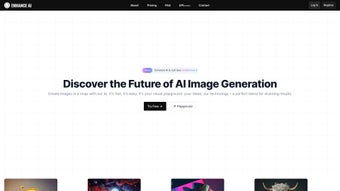
EnhanceAI.art is a cloud‑based, AI‑driven graphics platform that transforms simple text prompts into photorealistic images within seconds. Leveraging state‑of‑the‑art diffusion models, the service offers three core workflows: Text‑to‑Image generation, Image‑to‑Image enhancement, and Customizable style presets. Whether you are a marketer looking for eye‑catching campaign visuals, an e‑commerce manager needing high‑resolution product shots, or a content creator seeking fast‑track illustration, EnhanceAI.art delivers professional‑grade results without the steep learning curve of traditional design suites.
What sets EnhanceAI.art apart is its built‑in editing toolbox. The AI‑upscaling engine can enlarge images up to 8× while preserving fine detail, and the face‑restoration module intelligently smooths skin, sharpens eyes, and corrects lighting inconsistencies. All processing occurs on secure remote servers, meaning users only need a modern web browser and an internet connection. A generous free tier allows up to five daily generations, while paid subscriptions unlock higher resolution limits, batch processing, and priority compute resources.
The platform’s user‑first design focuses on speed, security, and scalability. Assets are stored encrypted on GDPR‑compliant cloud storage for up to 30 days, and the service offers API access for developers who wish to embed image generation into their own workflows. In short, EnhanceAI.art combines the creative freedom of generative AI with practical tools that streamline the entire visual‑content pipeline, making it an indispensable addition to any digital‑creation toolkit.
Key Features
- Text‑to‑Image Generation: Convert natural‑language prompts into high‑quality images in seconds, with multiple aspect‑ratio options.
- Image‑to‑Image Enhancement: Upload existing photos for automatic resolution boost, color correction, and detail refinement.
- Customizable Style Presets: Choose from pre‑built artistic filters or create your own branding‑consistent style library.
- AI Upscaling (2×‑8×): Enlarge low‑resolution assets without pixelation, ideal for print and large‑format displays.
- Face Restoration: Advanced algorithms that smooth skin, brighten eyes, and balance lighting on portrait images.
- Batch Processing: Process multiple images in a single job to save time on bulk projects.
- RESTful API: Full programmatic access for integration with websites, mobile apps, and automation pipelines.
- Secure Cloud Storage: Encrypted, GDPR‑compliant storage for generated assets with automatic 30‑day expiry.
- Version History: Track revisions and revert to earlier outputs with a single click.
- Multi‑Language Prompting: Supports English, Spanish, French, German, Japanese and more.
Each feature follows a “no‑code” philosophy, allowing users of any skill level to produce polished visuals. The underlying diffusion models have been trained on millions of public images, giving the AI a deep understanding of lighting, composition, and texture. For example, a prompt such as “golden sunrise over a misty mountain range, ultra‑realistic” results in a scene where the AI not only selects the correct color palette but also adds subtle atmospheric haze, realistic cloud formations, and accurate terrain shading—all without any manual adjustments.
Power users benefit from the Customizable Style module, which stores a set of parameters (color grading, contrast, grain, etc.) that can be applied across dozens of generated assets. This ensures visual consistency for brand campaigns or thematic series. Meanwhile, developers can leverage the API to automate content creation for dynamic ad networks, e‑commerce catalog updates, or social‑media scheduling tools, dramatically reducing the time and cost associated with manual graphic design.
Installation & Usage Guide
Getting Started – Web Interface
Because EnhanceAI.art is fully cloud‑based, there is no software to install on your computer. Simply open a supported browser (Chrome, Firefox, Edge, or Safari) and follow these steps:
- Navigate to enhanceai.art and click “Sign Up.” Register using an email address or a social‑login (Google/Facebook) for instant access.
- Select a subscription plan. The free tier grants five generations per day at a maximum resolution of 1024×1024 px. Paid plans start at $9.99 /month and provide higher limits, 4K+ outputs, and batch processing.
- After email verification, you are taken to the Dashboard where you’ll see tabs for “Create Project,” “Upload Image,” and “API Keys.”
- To generate an image, choose “Text‑to‑Image,” type your prompt, pick a style preset (or leave it on “Default”), and press “Generate.” Results appear within 5‑15 seconds.
- For enhancement, click “Upload Image,” select a file (JPG, PNG, or WEBP ≤ 20 MB), choose the enhancement type (Upscale, Face Restore, Color Boost), and click “Process.” The refined image is displayed with a download button.
API Integration – Developer Workflow
Developers can retrieve an API key from the “API Keys” section of the Dashboard. The API follows standard REST conventions and returns JSON responses. Below is a minimal example for text‑to‑image generation:
POST https://api.enhanceai.art/v1/generate
Headers:
  Authorization: Bearer YOUR_API_KEY
  Content-Type: application/json

Body:
{
  "prompt": "A futuristic cityscape at night, neon lights, ultra‑realistic",
  "style": "cinematic",
  "resolution": "2048x2048"
}
The response includes a unique job ID and a URL to the generated image. Additional endpoints support batch jobs, image‑to‑image enhancement, and webhook callbacks for real‑time status updates. Comprehensive documentation provides sample code in Python, JavaScript, and cURL, making integration straightforward even for teams with limited AI experience.
Compatibility & System Requirements
EnhanceAI.art runs entirely in the cloud, so it is compatible with any operating system that can launch a modern web browser. Below is a quick compatibility matrix:
- Windows: Windows 10, Windows 11 – Chrome, Edge, Firefox, or Safari (via WSL).
- macOS: macOS 12 Monterey and later – Safari, Chrome, Firefox.
- Linux: Ubuntu 20.04+, Fedora 34+, Debian 10+ – Chrome or Firefox recommended.
- Mobile: iOS 14+ (Safari, Chrome) and Android 9+ (Chrome, Firefox) – full functionality, UI optimized for touch.
Because all heavy‑lifting occurs on remote servers, local hardware specifications are not a bottleneck. However, a stable broadband connection (minimum 5 Mbps download, 2 Mbps upload) is recommended to ensure smooth uploads of high‑resolution source files and rapid retrieval of generated assets. For enterprise integrations, a server environment with reliable outbound HTTPS connectivity to api.enhanceai.art is sufficient.
Security is a core priority: all data in transit is encrypted with TLS 1.3, and stored assets are encrypted at rest. Users retain full ownership of their images, and GDPR‑compliant retention policies automatically delete files after 30 days unless an “Extended Archive” add‑on is purchased. Enterprise customers can negotiate private‑cloud deployments behind their own firewalls for added compliance.
Conclusion, Pros & Cons, and Frequently Asked Questions
Pros
- Generates photorealistic images from simple text prompts with minimal learning curve.
- Integrated AI upscaling and face‑restoration eliminate the need for separate editing tools.
- Web‑based interface works across Windows, macOS, Linux, iOS, and Android.
- Robust API enables automation and seamless integration into existing workflows.
- Transparent pricing model includes a generous free tier for occasional use.
- Secure, GDPR‑compliant cloud storage protects intellectual property.
Cons
- High‑resolution (4K + ) outputs are limited to paid subscriptions.
- Service depends on an internet connection; offline generation is not possible.
- Complex prompts may require several iterations to achieve the exact desired composition.
- Free tier’s daily generation limits can be restrictive for power users.
- Creating custom style presets involves a short learning curve for non‑designers.
FAQ
Can I use the generated images for commercial projects?
Yes. All images produced with EnhanceAI.art are royalty‑free for commercial use under the standard license included with every subscription. Enterprise plans provide extended usage rights and a downloadable license certificate.
How long does it take to generate a high‑resolution image?
Generation time depends on resolution and current model load. Typical 2048×2048 images are produced in 8‑12 seconds, while 8K outputs may require up to 30 seconds. Premium users receive priority processing, reducing wait times.
Is there a limit on how many images I can store?
Images are retained for 30 days on the secure cloud storage included with your plan. If longer retention is needed, you can download files locally or purchase the “Extended Archive” add‑on, which keeps assets for up to one year.
Do I need any technical background to use the API?
No. The API follows standard REST conventions and includes clear documentation, example code in Python, JavaScript, and cURL, as well as a sandbox environment for testing. Basic knowledge of HTTP requests is sufficient.
What file formats are supported for uploads and downloads?
Uploads accept JPEG, PNG, and WEBP files up to 20 MB. Generated assets can be downloaded as lossless PNG (default) or JPEG with adjustable quality. Upscaled files retain the original format unless a conversion option is selected.
In summary, EnhanceAI.art offers a powerful blend of generative AI and practical editing tools that streamline visual‑content creation for individuals and teams alike. While an internet connection and premium pricing for ultra‑high‑resolution outputs are considerations, the platform’s speed, flexibility, and secure infrastructure deliver strong overall value. Ready to boost your creative workflow? Sign up for a free account today and experience the future of image generation. For enterprise licensing or on‑premise solutions, contact the sales team for a customized quote.



.png)